jaxhps documentation
The jaxhps package provides utilites for constructing fast, direct solvers for systems of linear elliptic partial differential equations. It uses jax for hardware-accelerated linear algebra operations.
Please see our preprint Hardware Acceleration for HPS Algorithms in Two and Three Dimensions for details about the algorithms implemented in this package. If you find this work useful, please cite our paper:
@misc{melia2025,
   title={Hardware Acceleration for {HPS} Algorithms in Two and Three Dimensions},
   author={Owen Melia and Daniel Fortunato and Jeremy Hoskins and Rebecca Willett},
   year={2025},
   eprint={2503.17535},
   archivePrefix={arXiv},
   primaryClass={math.NA},
   url={https://arxiv.org/abs/2503.17535},
}
Source Repository
Available on GitHub at https://github.com/meliao/jaxhps.
Installation
The jaxhps package requires scipy>=1.14 and jax>=0.4. You can use pip to install jaxhps and its dependencies it directly from PyPI:
pip install jaxhps
However, if jax is not already installed, this will install a CPU-only version of jax. If you want to install jax with GPU support, the suggested installation command is:
pip install jax[cuda12]
pip install jaxhps
Where cuda12 should be replaced with the appropriate CUDA version for your system. See the jax installation guide for more details on installing JAX with GPU support.
The examples require additional packages matplotlib>=3.8.4 and h5py>=3.11.0. If you want to install them automatically, use:
pip install jaxhps[examples]
Usage quickstart
You can use the jaxhps package to solve systems of linear elliptic PDEs by first specifying the root of the domain, and then specify the parameters for the high-order composite spectral collocation scheme:
import jaxhps

root = jaxhps.DiscretizationNode2D(xmin=0.0, xmax=1.0, ymin=0.0, ymax=1.0)

domain = jaxhps.Domain(p=16, # polynomial degree of leaf Chebyshev points
                      q=14, # polynomial degree of boundary Gauss-Legendre points
                      root=root, # root of the domain tree
                      L=3, # number of levels in the domain tree
                     )
The jaxhps.Domain object will construct the discretization tree and all of the discretization points. There are utilites provided for high-order polynomial interpolation to and from the discretization points. This example constructs a uniform 2D quadtree with L=3 levels, but the code can also support octrees for 3D problems and non-uniform (adaptive) trees in both 2D and 3D.
You can then define a jaxhps.PDEProblem to specify a differential operator and source term. Suppose we want to solve this problem:
We can define an instance of PDEProblem to represent this problem as follows:
import jax.numpy as jnp
import jaxhps

# It's helpful to use the Domain's quadrature points
source_term = jnp.zeros_like(domain.interior_points[..., 0])
D_xx_coeffs = jnp.ones_like(domain.interior_points[..., 0])
D_yy_coeffs = jnp.ones_like(domain.interior_points[..., 0])

# Create the PDEProblem instance
pde_problem = jaxhps.PDEProblem(domain=domain, # the domain we constructed above
                              source=source_term,
                              D_xx_coefficients=D_xx_coeffs,
                              D_yy_coefficients=D_yy_coeffs
                              )
This PDEProblem instance now represents the differential operator and source term for our problem. The coefficients for the differential operator can be constant or can vary spatially, as long as they are defined on the interior points of the domain. Now that the PDEProblem is defined, we can build a direct solver for it using jaxhps.build_solver().
# Doesn't return anything. Stores solution operators inside the pde_problem instance
jaxhps.build_solver(pde_problem=pde_problem)
Now that the solver has been built, we can apply boundary data to get the solution using jaxhps.solve().
# Define the boundary data
boundary_data = domain.boundary_points[..., 0]**2 - domain.boundary_points[..., 1]**2

# Apply the boundary data to the solver
solution = jaxhps.solve(pde_problem=pde_problem,
                       boundary_data=boundary_data)
The jaxhps.solve() function will return the solution on the HPS grid points, which are ordered in a particular way to make the computation easier. To visualize the solution, it’s easiest to use the jaxhps.Domain’s interpolation utilities to interpolate the solution to a regular grid:
# Interpolate the solution onto a regular grid for plotting.
n_pixels = 100
x_pts = jnp.linspace(root.xmin, root.xmax, n_pixels)
y_pts = jnp.linspace(root.ymin, root.ymax, n_pixels)

solution_pixels, pixel_locations = domain.interp_from_interior_points(
   solution, x_pts, y_pts
)
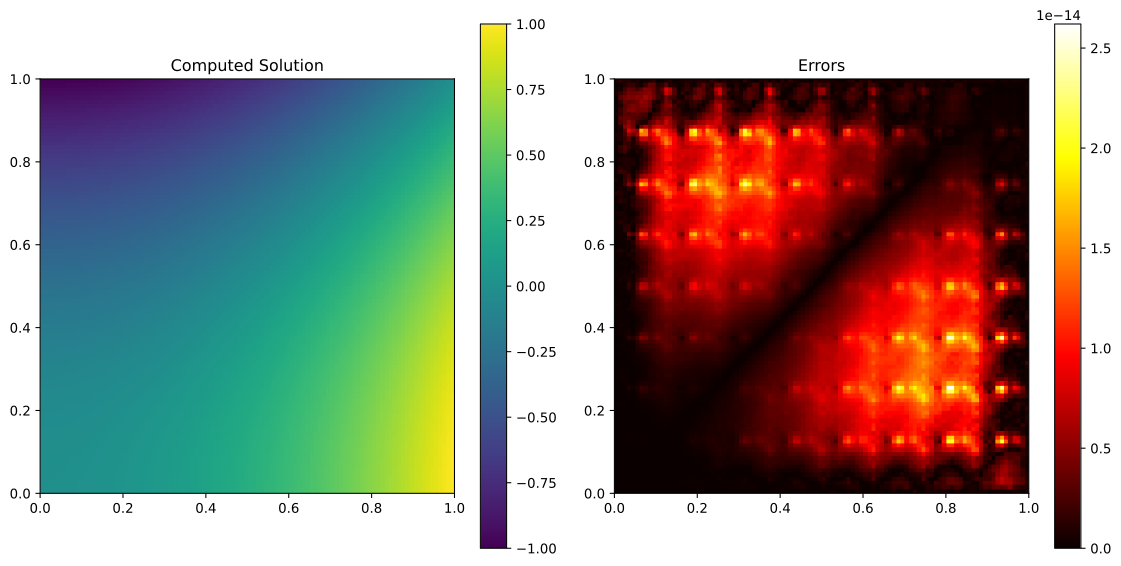
Now we can use matplotlib to visualize the solution. We know the analytical solution of this problem is \(u(x) = x_1^2 - x_2^2\), so we can compare the numerical solution to the analytical one:
import matplotlib.pyplot as plt

# Expected solution for comparison
expected_solution = pixel_locations[..., 0] ** 2 - pixel_locations[..., 1] ** 2

# Plot the computed solution and the deviations from the expected solution.
fig, ax = plt.subplots(1, 2, figsize=(12, 6))
im_0 = ax[0].imshow(
   solution_pixels,
   extent=(root.xmin, root.xmax, root.ymin, root.ymax),
   origin="lower",
)
plt.colorbar(im_0, ax=ax[0])
ax[0].set_title("Computed Solution")
im_1 = ax[1].imshow(
   jnp.abs(solution_pixels - expected_solution),
   extent=(root.xmin, root.xmax, root.ymin, root.ymax),
   origin="lower",
   cmap="hot",
)
plt.colorbar(im_1, ax=ax[1])
ax[1].set_title("Errors")
plt.tight_layout()
plt.show()
This should show the following figure. Note that even after interpolation, the solution is within \(3 \times 10^{-14}\) of the expected solution.
In the jaxhps package, there are many more utilities for working with HPS algorithms, including adaptive discretization methods, computing on GPUs, and interpolation to and from the HPS discretization.